Your Stripe meter stopped reporting and you didn't realize for days
Metered billing fails quietly. A dropped webhook or a broken deploy can stop a Stripe meter cold, and you usually find out at invoice time. Here's why it happens and how to catch it early.
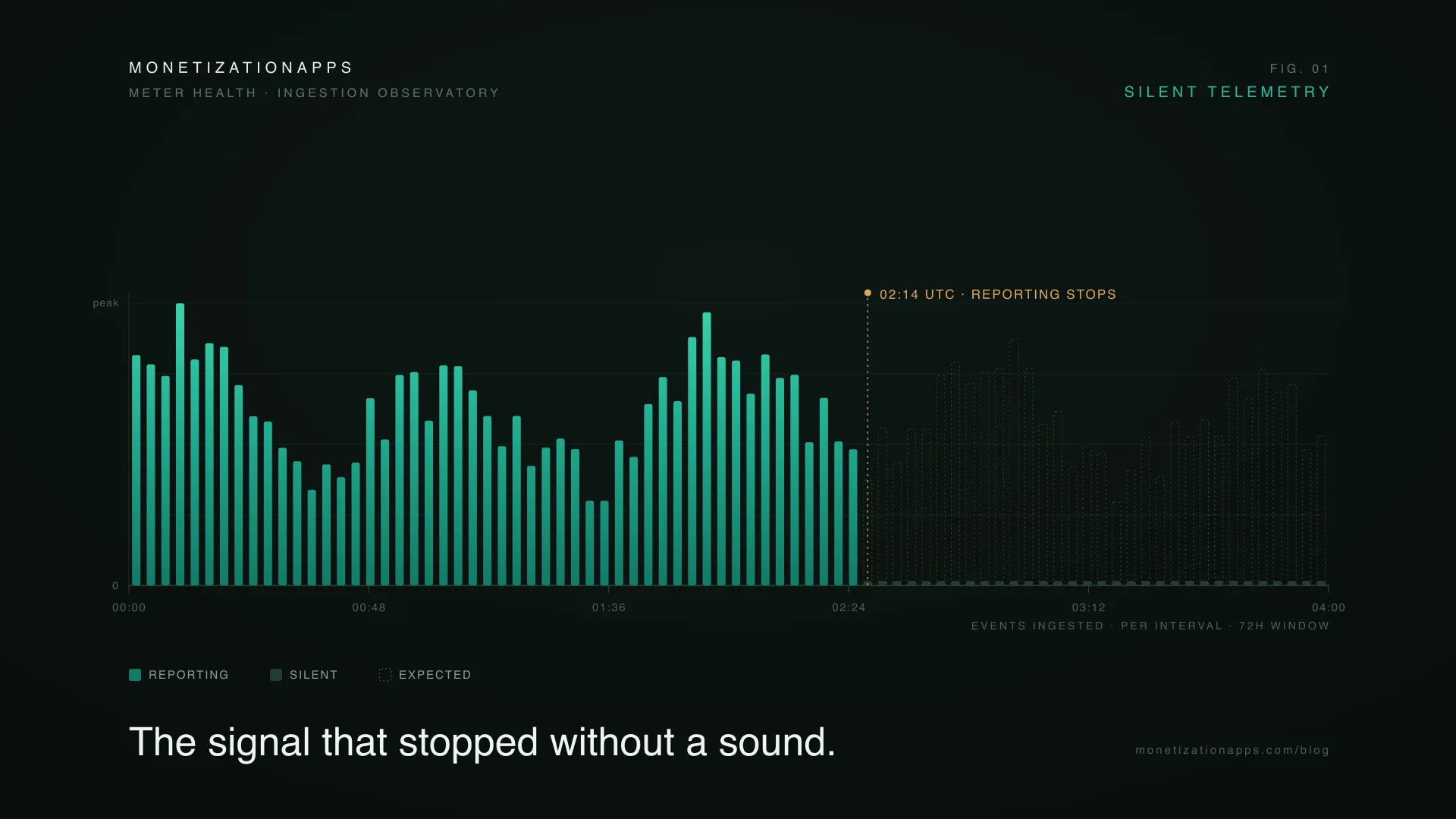
There’s a kind of billing bug that never pages you. No error banner, no failed charge, no angry customer. A meter just goes quiet. Events stop landing in Stripe, usage keeps happening, and every dashboard you check looks fine.
Then the invoice runs. An account that normally bills 40,000 events bills 6,000. By the time you notice, the period is closed and your options have narrowed. You can try to backfill the missing usage, but only if the raw events still exist to backfill from. Source systems age out their history, and an external provider may keep logs for only a limited window. Miss it and the usage is gone, with no record and nothing to correct against.
This happens so often because metered billing fails silently by design, and Stripe doesn’t tell you when a meter goes dark.
Why meters go quiet without anyone noticing
Usage-based billing has a property seat-based billing doesn’t. The number that matters is produced continuously, often not even by you but by an external AI or infrastructure provider, and it only becomes visible at cycle end. Anything that interrupts that stream stays invisible until then.
The causes are boring, which is exactly why they slip through:
- A dropped or failing webhook. The event meant to fire your usage-reporting call never arrives, or arrives and errors. Stripe’s meter never sees the usage.
- A deploy that broke the reporting path. A refactor renames an event, a worker starts throwing, a rotated API key returns 401s. Your product works perfectly; your billing doesn’t.
- A meter misconfigured after a change. The event name on your side and the meter’s
event_namein Stripe drift apart, often because one team owns the product meter and another owns the pipeline, so a change on one side never reaches the other. Events go into a void. - Rate limits or timeouts under load. Reporting calls get dropped during exactly the spikes that generate the most billable usage.
None of these throw an error in product monitoring. From the product’s side, nothing is wrong. The failure lives in the billing pipeline, and increasingly part of that pipeline now sits inside Stripe, where you have even less ability to watch it minute to minute.
Why you find out so late
Stripe gives you almost no way to notice this on your own. Meter events are effectively write-only. Once sent, you can’t query them back to reconcile against what your product actually did. There’s no native alert for “this meter reported 90% less than yesterday.” The dashboard shows the usage it received, not the usage it should have received. A meter reading zero and a genuinely idle meter look identical.
So the first signal most teams get is the invoice itself, which is the worst possible moment. The period is closed, the numbers are locked, and a fix, if one is still possible, is a retroactive correction that costs you either revenue or credibility.
What it actually costs
Price it out. A meter feeding one enterprise account goes dark for three days mid-cycle. On a 30-day invoice that is roughly 10% of the bill, gone, after you have already paid the compute cost to serve that usage. Widen it to a segment and it becomes a reporting gap discovered after close, with no clean way to bill for work you already did. For AI and infrastructure products with real per-event costs, a quiet meter is margin walking out the door.
But lost revenue is only the part you can put a number on. The quieter cost is trust in your billing. Issue a correction and you teach a customer that your invoices aren’t reliable, and once someone suspects you’re wrong in one direction, they start wondering about the other. Usage-based pricing only works if customers believe the invoice reflects what they actually did, and a backfill can’t win that back.
How to catch it early
The reporting path will still break occasionally, so the real fix is monitoring the meter itself as a live signal, the way you’d monitor uptime. Speed matters here, because detection and recovery are linked. Catch a quiet meter within hours and you can usually backfill before it matters, while the source events still exist and the period is still open. Every day you don’t notice is a day closer to those events aging out, and a day in which more invoices finalize without the corrected data. Caught same-day, it’s a backfill. Caught in three weeks, it’s manual corrections across dozens of already-sent invoices.
Practically:
- Track continuity, not just totals. Know the moment a meter’s reporting rate falls off a cliff relative to its own baseline.
- Watch expected versus actual. A zero is only alarming if that meter is supposed to be active. Knowing each meter’s normal cadence turns silence into a signal.
- Keep coverage across all meters in one view. Failures rarely announce which meter broke. A single view of last activity turns “something feels off” into “this meter stopped at 2am.”
- Alert on drops, not just failures. The dangerous case is a meter that keeps succeeding while reporting far less than it should.
One assumption trips up teams who think they’ve already covered this: observability into your own infrastructure isn’t enough. Your app can be green everywhere while the meter is dark, because the failure lives in the seams: the integration into Stripe’s metering pipeline, and often a third-party AI or infrastructure provider you don’t monitor at all. The only place the gap shows is at the meter, which is why that’s what you watch.
Where MeterMonitor fits
This is the gap MeterMonitor’s Meter Health closes. It monitors the continuity of event ingestion across your Stripe meters, surfacing gaps, silence periods, and anomalies, along with each meter’s last activity, reporting coverage, and a 72-hour telemetry view. Paired with usage-drop alerts, a meter going quiet becomes something you hear about the same day, not something you discover when the invoice lands.
You’ve already paid to serve the usage. The only question is whether you find out in time to bill for it.